BlackBerry App World is set to close at the end of the year, so this is the last chance to download any apps including all Ebscer apps. I had hoped to publish some last minute updates before the shut down, but apparently the option to publish updates ended a month ago without me realizing it.
To the many BlackBerry users that have supported me and my apps over the past decade, thank you.
After eight years of requests, Pixelated Plus is finally available for the iPhone. This new version of the game has all the same features as the BlackBerry and Windows releases of Pixelated. A one time in-app purchase can be used to unlock all statistics and features and grid sizes in the game.
The BlackBerry 10 version of Pixelated Plus has also been updated to add make showing the number of remaining moves in a game to be optional.
About Pixelated
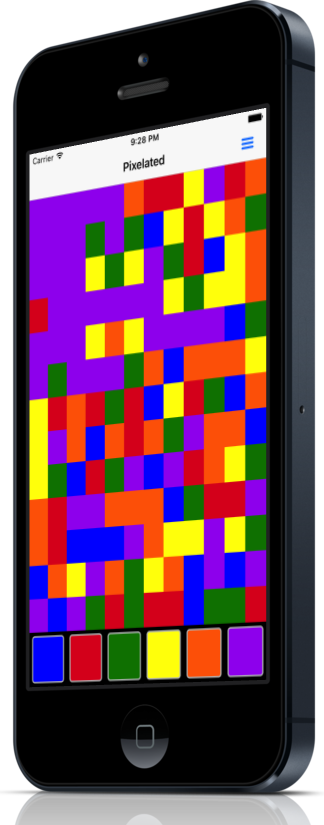
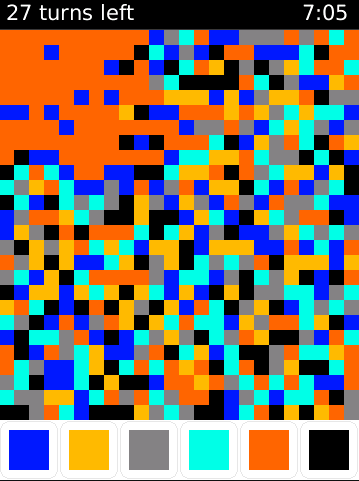
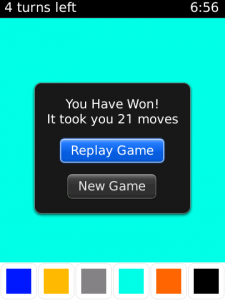
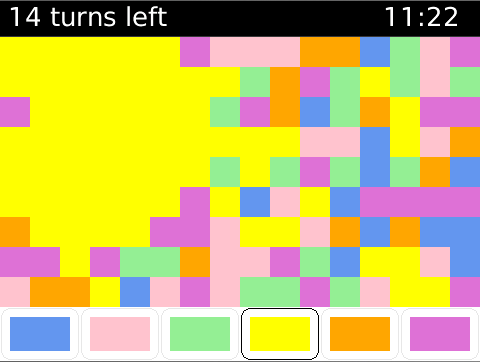
Pixelated is an addictive puzzle based strategy game that requires a mixture of skill and luck in order to accomplish. The object of the game is to change the colour of the squares until the entire screen is a single solid colour. Starting with the square in the upper left corner you can change the colour of the blocks in order to match that of the surrounding squares. This is done repeatedly until the entire screen is a single colour. The object of the game is to clear the screen in as few moves as possible. Under the default settings you must do so in under 22 moves in order to win. The game is controlled by the large colored blocks at the bottom of the screen.
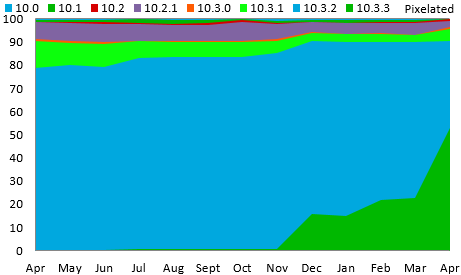
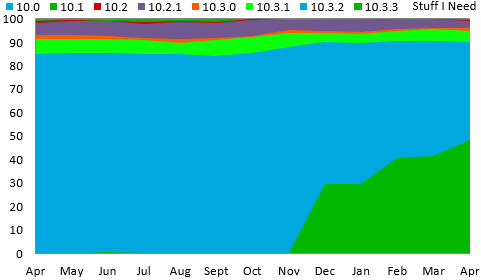
Use of 10.3.3 approaches 50% of BlackBerry 10 users
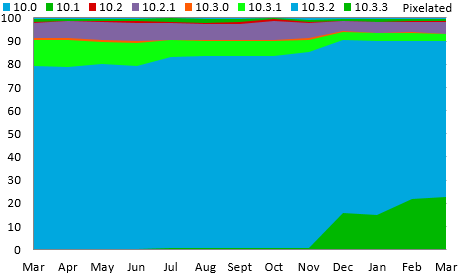
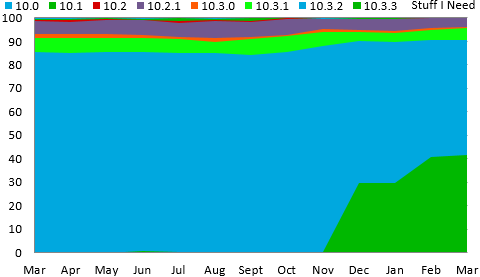
The launch of BlackBerry 10.3.3 remains slow, but has finally reached half of the users running BlackBerry 10 phones. Use of BlackBerry’s newest (and final) OS has reached 52.8% of Pixelated users, and 48.5% of users of the Stuff I Need app.
This data was collected by BlackBerry World for downloads of the free strategy game Pixelated and the free checklist app Stuff I Need. Data shown on the chart is from the beginning of April 2016 through the end of April 2017.
The BlackBerry 10 game Head Words has been updated to version 1.4 in BlackBerry App World. This update expands the number of items in the game’s existing categories. This is partially to account for new movies and tv shows that have been released since the last update, and partially to simply add more depth to the other categories.
About Head Words
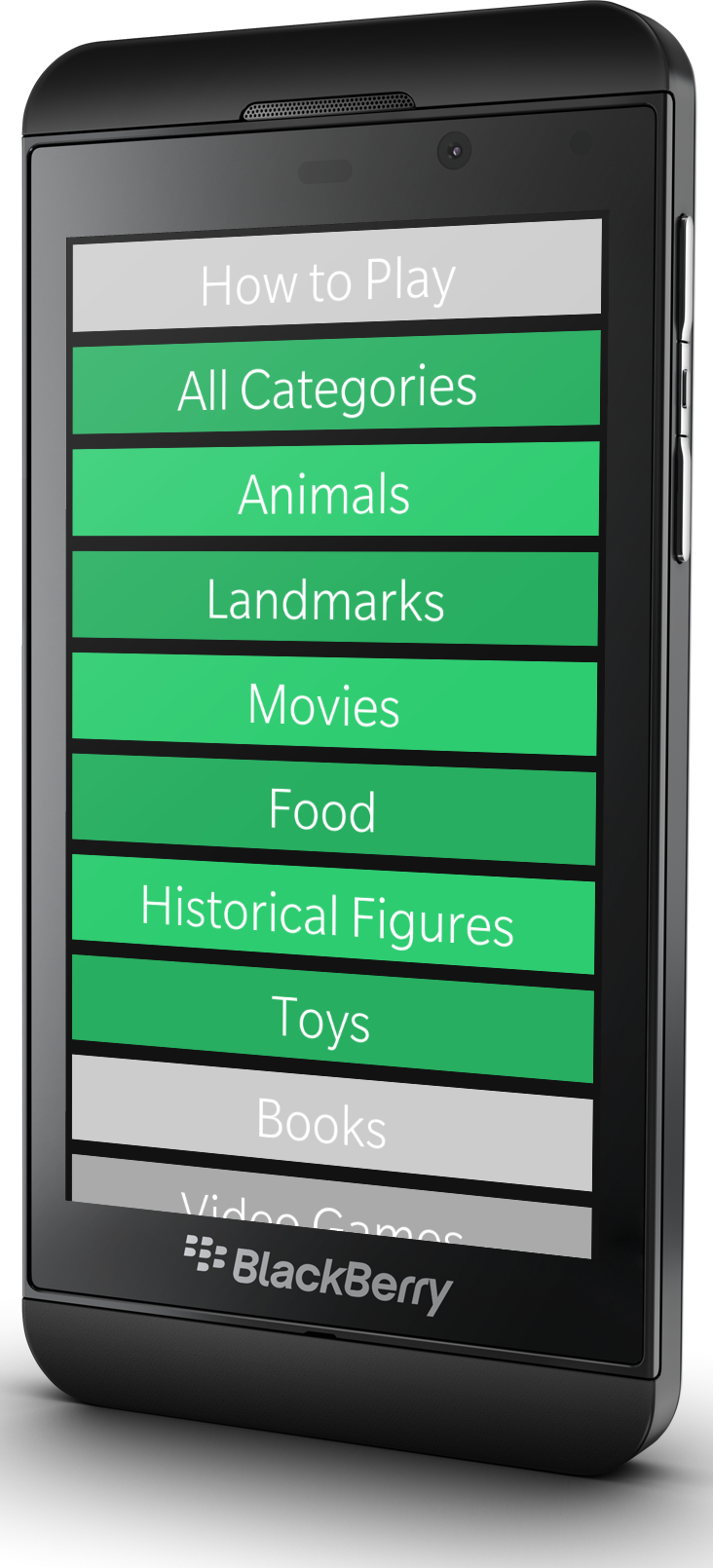
Head Words is a native multi-player guessing game where after selecting a category, one player places the phone on their forehead while the other players give clues. With one minute to guess as many words as possible, the player can tilt the phone down for each correct answer, or tilt the phone up to pass. At the end of round a word list will show what was guessed right and wrong. The swipe down menu provides an option to turn the sound on or off.
The game includes five categories for free, and the option to purchase access to ten additional categories for a dollar each.
Adoption of the final version of BlackBerry OS remains slow, with most users still using the older 10.3.2 version. In March the use of 10.3.3 was well below half, reaching only 41.7% of Stuff I Need users, and 22.7% of Pixelated users.
This data was collected by BlackBerry World for downloads of the free strategy game Pixelated and the free checklist app Stuff I Need. Data shown on the chart is from the beginning of March 2016 through the end of March 2017.
BlackBerry AppWorld turns ten years old today.
While the store is currently limping towards its demise at the end of the year, it is worth celebration and acknowledging the run that it has had. Ten years is a long time, and for many of those years it was at the center of my world. It was the means through which all of my hard work was distributed to tens of millions of others.
For many years it was the only way that I collected money to pay my rent.
BlackBerry has moved on from apps and phones, and quite honestly I have since moved on from BlackBerry.
But I still miss it at times. So, here is to a celebration of AppWorld’s final birthday. At the very least it was good to me…
Originally posted at news.ebscer.com The number of BlackBerry phones running OS 6.0 has increased to 25.2% of the market last month. While 84.0% of BlackBerrys now run OS 5.0 or higher.
Eight months after the release of OS 5.0 it had already captured over twice the market, while OS 6.0 is only doing half as well at the eight month mark. Overall adoption of the newer OS is mostly being held back by the limited number of upgrades from devices that originally were released with 5.0 operating systems. Given the lack of an upgrade path, it would be expected to see a similarly slow uptake of OS 7.0 when it is released this summer. (Although 7.0 will be helped some by being available on all the major US carriers at launch).
As usual this data is taken from downloads of the popular BlackBerry strategy game Pixelated. Data starts from the release of version 2.0 in April of 2010, and goes through the end of last month.
Version 2.3 of Pixelated introduces alternate colour schemes to mix up the appearance of the game. Besides the standard colour scheme that has been available all along, there is now also the possibility of selecting a pastel theme, an "other" theme (pictured above), a Black & White theme, as well as all red, and all blue themes.
Replay Games
A new feature exclusive to the Plus version of Pixelated is the ability to replay games. Now following the conclusion of a game (win or loss), along with seeing the outcome of the previous game, an opportunity to replay the same layout over again will be presented. This will allow you to take another try at a screen that you are unable to beat, or to try and get a better score then you just posted.
Clear Statistics
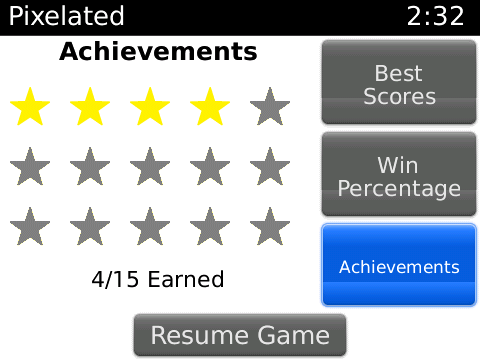
Inside the statistics, best scores, and achievements pages there is now a menu option to clear all statistics, best scores, and achievements that you have earned so far. Be careful, however, because this can not be undone.
BlackBerry Torch Support
Pixelated Plus version 2.3 supports the brand new BlackBerry Torch 9800. On the Torch Pixelated can be played by both the touch screen and the trackpad. The soon to be released BlackBerry Curve 9300 will also be supported.
Pixelated Plus requires a minimum of OS 4.6 considering that is met the 8330, 8350i, 8520, 8530, 8900, 8910, 9000, 9100, 9105, 9500, 9520, 9530, 9550, 9630, 9650, 9700, and 9800 are all supported.
Twinkle a free Application for BlackBerry is now available through BlackBerry AppWorld. Twinkle is a simple application that allows you to set and keep track of upcoming and past events. Twinkle will tell you how far away an event is, and allow you to add it to your BlackBerry's calendar.
The ability to add and edit events, lets you keep track of how soon something is, or how long it has been.
Pixelated Plus has been updated to version 2.2. This newest version improves the performance of the application. Additionally the file size has been reduced by 11.2% from version 2.1 of this already lean application.
The object of Pixelated is to change the colour of the squares until the entire screen is a single solid colour. This is done by using the coloured buttons on the bottom of the screen to change the colour of the square in the upper left hand corner to that of those surrounding it. Changing this square to the colour of those around it, allows it to slowly grow until it fills the entire screen. The ultimate goal is to clear the screen in as few moves as possible.
The full list of supported devices for Pixelated Plus includes the 8330, 8350i, 8520, 8530, 8900, 9000, 9100, 9105, 9500, 9520, 9530, 9550, 9630, 9650, and 9700 (min OS 4.6).
Pixelated and Pixelated Plus have both been upgraded to version 2.1 adding support for the new BlackBerry Pearl 9100 and 9105.
This version also adds an internal link for email support, as well as a few bugfixes.
The full list of supported devices for Pixelated and Pixelated Plus now include the 8330, 8350i, 8520, 8530, 8900, 9000, 9100, 9105, 9500, 9520, 9530, 9550, 9630, 9650, and 9700 (min OS 4.6).
The object of the game is to change the colour of the squares until the entire screen is a single solid colour. This is done by using the coloured buttons on the bottom of the screen to change the colour of the square in the upper left hand corner to that of those surrounding it. Changing this square to the colour of those around it, allows it to slowly grow until it fills the entire screen. The ultimate goal is to clear the screen in as few moves as possible.
10,000 Farkle has been updated to version 1.1 adding some new features. 10,000 Farkle is a dice game that requires both skill and luck. Points are awarded for various dice combinations, but if a roll fails to contain any combinations the turn ends with no points awarded.
New to 10,000 Farkle are in game achievements, backup/synchronization, smoother animation, and the option to turn animation on and off.
Smoother Animation
Version 1.1 of 10,000 Farkle smooths out the animation of the dice rolling to give the game a better flow.
Achievements
New to version 1.1 are in game achievements. They can be an easy way to track your progress through the game, and to show off your accomplishments to others.
Backup/Synchronization
10,000 Farkle now offers backup/restore synchronization through BlackBerry Desktop Manager. This allows you to back up your settings, achievements, and high scores to your computer and to allow them to be kept if your BlackBerry needs to be reset or if you upgrade to a new model.
How to play
Farkle gives you six dice to roll and awards points for a straight, three pairs or three or more of the same number. Fewer points ares also awarded for each individual 1 and 5. Any dice that do not score can be re-rolled for additional points. If all 6 dice can be scored, all of the dice can be re-rolled on the same turn.
The skill in this game comes from knowing how far to push your luck, and which scoring combinations to take, and which to re-roll.
The default game mode gives you 10 turns to score as many points as you can. The 10,000 point mode is the traditional way to play, where the goal is to reach 10,000 points in as few turns as possible. The two competitive game modes "vs Friend" and "vs Computer" both use the traditional race to 10,000 points.
Supported Devices
10,000 Farkle requires a minimum OS of 4.6 and supports the 8330, 8350i, 8520, 8530, 8900, 9000, 9500, 9520, 9530, 9550, 9630, 9650, and 9700.
Pixelated adds support for Bold and Curve with Version 2.0
The free game Pixelated, one of the ten most popular games in BlackBerry AppWorld, and currently the fourth ranking free application has been upgraded to version 2.0. This new version adds support for the BlackBerry Curve and Bold so that the application now supports almost all devices. The full list of supported devices now includes 8330, 8350i, 8520, 8530, 8900, 9000, 9500, 9520, 9530, 9550, 9630, 9650, 9700 (min OS 4.6).
The new version of the application also adds a number of new features, including such as an Achievement system, and the ability to backup/synchronize game settings.
Greater Device support
All versions of the BlackBerry Curve and Bold are now supported, in addition to the devices that already were. This brings the full list of supported devices to the following: 8330, 8350i, 8520, 8530, 8900, 9000, 9500, 9520, 9530, 9550, 9630, and 9700. The game will also support the 9650 when it launches.
Achievements
In game achievements can be an easy way to track your progress through the game, and to show off your accomplishments to others.
Synchronization
Pixelated Plus now offers backup/restore synchronization through BlackBerry Desktop Manager. This allows you to back up your settings and achievements to your computer and to allow them to be kept if your operating system needs to be reset or upgraded.
Interface Improvements
Parts of the interface have been upgraded for a better and easier experience. Additionally theme support has been greatly expanded so that Pixelated now works with a greater number of custom themes.
Pixelated Plus Version 2.0 is now available for download from BlackBerry AppWorld. This version comes with a number of improvements ranging from greater device support to achievements and synchronization, to the much requested move counter.
Move Counter
A move counter has been by far one of the most requested enhancements to Pixelated. While it has no effect on the gameplay it can help you know how well the current game is going so you can better manage your moves. The move counter can be turned on from the options menu.
Greater Device support
All versions of the BlackBerry Curve and Bold are now supported, in addition to the devices that already were. This brings the full list of supported devices to the following: 8330, 8350i, 8520, 8530, 8900, 9000, 9500, 9520, 9530, 9550, 9630, and 9700. The game will also support the 9650 when it launches.
Achievements
In game achievements can be an easy way to track your progress through the game, and to show off your accomplishments to others. While Version 2.0 will keep any best scores and statistics earned in early versions of the game, all achievements must be earned after the upgrade to version 2.0
Synchronization
Pixelated Plus now offers backup/restore synchronization through BlackBerry Desktop Manager. This allows you to back up your settings and statistics to your computer and to allow them to be kept if your operating system needs to be reset or upgraded.
Interface Improvements
Parts of the interface have been upgraded for a better and easier experience. Additionally theme support has been greatly expanded so that Pixelated now works with a greater number of custom themes.
The adoption rate for BlackBerry OS 5.0 continues to be slower than expected. When first looked at one month after release 61% of 9530 users had upgraded to OS 5.0.
Now it looks as if they have aced the test, and even more importantly is the speed at which it passes. Currently it takes over a minute to get to the full score, the speed in the video is much quicker than that. Overall javascript speed in the browser looks to be much improved, as well as pan/zoom speeds. Overall it looks to be a great improvement coming to the BlackBerry Browser, and hopefully will be released soon.
A few models of the BlackBerry Curve 8330 are now being upgraded to operating system 5.0 which will make them compatible with the Hockey Scores and 10,000 Farkle applications. As this is older hardware, the applications may run a bit slower, but we are still happy to add compatibility for these very popular devices.
Hockey Scores for Blackberry has been upgraded to version 1.6 for all supported devices, and is now available for free through BlackBerry AppWorld.
The Hockey Scores app that is the simplest and most effective way to get NHL scores from across the league straight to your BlackBerry. It is lightweight and fast in order to give you scores and statistics can be updated as quick as possible, and require no effort your part.
Version 1.6 of Hockey Scores is supported on all BlackBerry Devices with OS 4.6 or newer. This makes the upgrade available to everyone who previously used version 1.3 or 1.5 of the application. The full list of supported devices at this point include the 8220, 8230, 8350i, 8520, 8530, 8900, 9000, 9500, 9520, 9530, 9550, 9630, and 9700.